| View previous topic :: View next topic |
| Author |
Message |
Mystic_Merlin
Joined: 15 Oct 2007
Posts: 533
Location: Bangkok
|
 Posted: Sat Jul 09, 2011 7:48 am Post subject: Posted: Sat Jul 09, 2011 7:48 am Post subject: |
 |
|
| Quote: | HI res pic are always welcome Wink
on electronic part like this one, it VERY useful ! |
Check your PM 
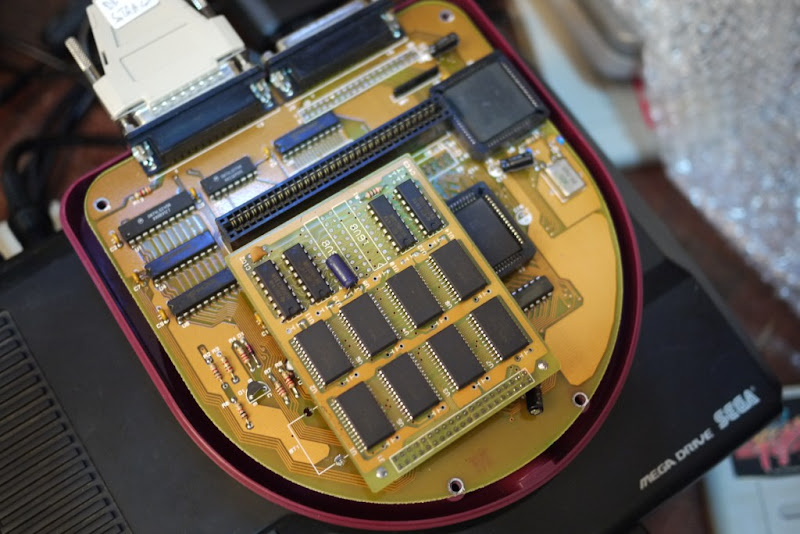
| Quote: | It seems you have the same mem board than Koji
It's funny because it's totally different from mine
Did I understand well ? SMD shares the same memory board that some others SNES backup units ? |
Yes.
The mem board up there is the one from my Supercom and both Magicom/Supercom were manufactured at the same time the SMD was, and by the same people so it make sense some models share the same mem board design.
| Quote: | what do you mean by that ? yes v3 is able to load cart to DRAM.
But when you select "run IC cart", it plays it directly from cart (not DRAM). |
I was indeed wondering if v3 was not also loading the cart to DRAM prior to playing it as I got these weird issues.
| Quote: | | If you know someone with a v4 bios, I'll be very interested in hi res pic of its board and dram board!! |
Nope sorry, I'll let you know if I come across one.
BTW if you happen to have an eagle shcematic of the ram board, let me know. I can get them made cheap and easy here.
|
|
| Back to top |
|
 |
KanedaFr
Joined: 16 May 2011
Posts: 16
|
| Posted: Sat Jul 09, 2011 9:31 pm Post subject: |
|
|
| Mystic_Merlin wrote: |
| Quote: | | Did I understand well ? SMD shares the same memory board that some others SNES backup units ? |
Yes.
The mem board up there is the one from my Supercom and both Magicom/Supercom were manufactured at the same time the SMD was, and by the same people so it make sense some models share the same mem board design.
|
Very interesting info !
| Mystic_Merlin wrote: |
| Quote: | what do you mean by that ? yes v3 is able to load cart to DRAM.
But when you select "run IC cart", it plays it directly from cart (not DRAM). |
I was indeed wondering if v3 was not also loading the cart to DRAM prior to playing it as I got these weird issues.
|
It's something I thought also...and that motive me to continue the bios analysis : I can confirm you it doesn't load to DRAM to play IC cart.
| Mystic_Merlin wrote: |
BTW if you happen to have an eagle shcematic of the ram board, let me know. I can get them made cheap and easy here. |
the only thing we have is these 2 schem : tcdev & charles (the right part)
I think mine is almost the same as Charles' one so I won't loose time to make it...
_________________
Genny dev is possible : Spritesmind.net |
|
| Back to top |
|
|
Mystic_Merlin
Joined: 15 Oct 2007
Posts: 533
Location: Bangkok
|
| Posted: Wed Jul 13, 2011 9:32 am Post subject: |
|
|
I found out something interesting about my SMD yesterday.
As I was wondering why it wouldn't display any higher size than 8M whatever the cart I'd put in, I decided to give a try with a 32M SPFQ mem board that had 4 HC138 demux.
First interesting thing is that unlike the previous Supercom mem board, this one would be seen as a 8M rather than a 4M. So I thought maybe it would even be able to load games above the 8M limit?
Next thing you know I was able to play Flashback and Panza, both 12M games.
16M roms are loading up fine but display messed up graphics.
Some 24M are displaying a few screens and black out.
I'll run some more tests when I have time. I need to find some other "exotic" 40 pins ram boards in my copiers.
|
|
| Back to top |
|
|
Riko78

Joined: 11 Mar 2009
Posts: 134
Location: Italia
|
| Posted: Wed Jul 13, 2011 11:15 am Post subject: |
|
|
Hi Friend,
I have another 16mb for my SMD... but is strange aaaahhhhhhh...
And for take this I have broken a link ..  ... ...
grrrrrrrrrrrrr
 
I can add a RAM? 
|
|
| Back to top |
|
|
Mystic_Merlin
Joined: 15 Oct 2007
Posts: 533
Location: Bangkok
|
| Posted: Wed Jul 13, 2011 11:53 am Post subject: |
|
|
| Riko78 wrote: | Hi Friend,
I have another 16mb for my SMD... but is strange aaaahhhhhhh...
And for take this I have broken a link .. ...
grrrrrrrrrrrrr
I can add a RAM? |
Thanks, that's interesting. It looks like this common Magicom/Supercom ram board has been modded for your SMD.
The "broken" link is probably going to the bottom right chip, on the pin next to the burnt wire.
If it doesn't involve cutting traces on the board, I wouldn't mind giving a try.
Has this board ever been working? successfully loading 16M games?
What BIOS version do you have?
Is it displaying 16M for the memory?
I seriously doubt there's a way to use more than 16M on a SMD without more hardware modification
EDIT: Actually after spending a bit more time on your photos, I'm thinking this is not a modification but a fix. It looks like the previous owner desoldered U3 and U4 and damaged the traces...just a guess.
|
|
| Back to top |
|
|
kazmat
Joined: 18 Apr 2005
Posts: 123
|
| Posted: Thu Jul 14, 2011 8:52 am Post subject: |
|
|
These pictures are my 32M SMD board & RAM.
At first, This unit is 24M version. later I add 2 memory chips.
For example I use 32M ram board of SMC, SWC, PF , but SMD recognize
16M only.
| Description: |
|
| Filesize: |
197.24 KB |
| Viewed: |
4838 Time(s) |

|
| Description: |
|
| Filesize: |
181.88 KB |
| Viewed: |
4838 Time(s) |

|
|
|
| Back to top |
|
|
Mystic_Merlin
Joined: 15 Oct 2007
Posts: 533
Location: Bangkok
|
| Posted: Thu Jul 14, 2011 9:11 am Post subject: |
|
|
| kazmat wrote: | These pictures are my 32M SMD board & RAM.
At first, This unit is 24M version. later I add 2 memory chips.
For example I use 32M ram board of SMC, SWC, PF , but SMD recognize
16M only. |
Thanks Kaz
If I understand properly you're saying the SMD recognize only 16M out of the 32M when you use SMC memory boards but the one picture above is a fully working 32M SMD board?
Check your mail
|
|
| Back to top |
|
|
kazmat
Joined: 18 Apr 2005
Posts: 123
|
| Posted: Thu Jul 14, 2011 1:44 pm Post subject: |
|
|
Yes first picture is 32M board for SMD. it is working.
To upgrade old SMD (8M, 16M model), you need newer ASIC chip & 32M board for SMD, and modify SMD main board. I think.
From a price list of National Console Support
Super Magic Drive 16M - $265 For the SEGA. Lifetime Eprom Support
Super Magic Drive 24M - $335 Lifetime Eprom Support, Power Adaptor
SMD 16M -> 24M Upgrade 24M - $105 Includes new dram, controller, dos
|
|
| Back to top |
|
|
KanedaFr
Joined: 16 May 2011
Posts: 16
|
| Posted: Tue Jul 19, 2011 9:22 am Post subject: |
|
|
hmm... it's not the first time I see a board with this wire on back...
Do you think it's for 32M support or 24M ?
may i ask you your BIOS version ? did you update it to add 32M support ?
thanks for the pics anyway!
_________________
Genny dev is possible : Spritesmind.net |
|
| Back to top |
|
|
Koji
Joined: 13 Aug 2011
Posts: 23
|
| Posted: Sat Aug 13, 2011 4:55 am Post subject: |
|
|
Here's the SMD I found (16M) . Unfortunately it had a corrupted bios (Magic Driver V-1)


I did managed to replace it with a new bios, cleaned and installed a new battery, works great now!..
My board is missing the RC reset circuit. Anyone knows how important is it?, or what exactly is it for?.
|
|
| Back to top |
|
|
|

 FAQ
FAQ Search
 Memberlist
 Usergroups
 Register
 Profile
 Log in to check your private messages
 Log in


