| View previous topic :: View next topic |
| Author |
Message |
Zaladora
Joined: 21 Oct 2024
Posts: 5
|
 Posted: Mon Oct 21, 2024 7:17 pm Post subject: SPFQ+ on the reboot while trying to load games Posted: Mon Oct 21, 2024 7:17 pm Post subject: SPFQ+ on the reboot while trying to load games |
 |
|
hello am new here and dusted off my SPFQ+ 24 M
while trying to load my disks the unit after a while reboots for no reason
checked the board and showed the little elco leaked a little
battery is replaced by another elco
seems there might be a current leakage? since he reboots and keep on rebooting when it gets warm ?
1 moment can load disk ok
other mo after trying to acces disks reboot reboot
using a variable power supply on 9 volt 1a
any member knows why it keeps rebooting?
going to try hook up my old pc to send games with parallel cable to the SPFQ+
|
|
| Back to top |
|
 |
Mystic_Merlin
Joined: 15 Oct 2007
Posts: 533
Location: Bangkok
|
| Posted: Tue Oct 22, 2024 6:14 am Post subject: |
|
|
I've had similar issues with a Pro Fighter X2 that had a defective large PEEL overheating. Have you checked if one IC is getting extremely hot?
Try to boot the SPFQ without the power supply, just with a cartridge on top and run several memory tests by pressing reset and keeping the B button pressed. If the copier runs only with cartridge or from DRAM and the issue does not occur then it might be your power supply or your FDD.
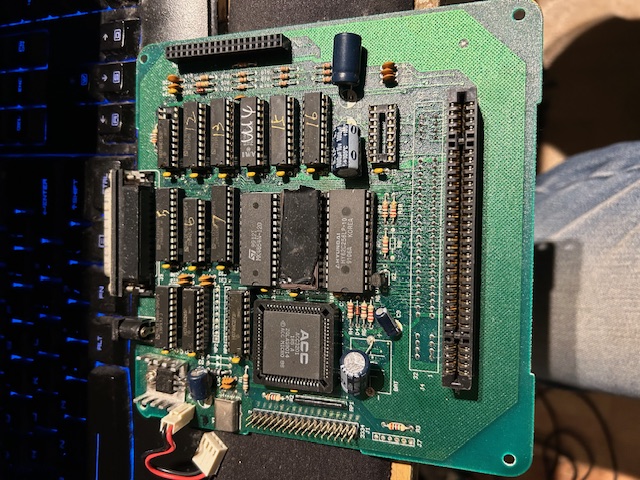
Maybe post a picture of your board
|
|
| Back to top |
|
|
Zaladora
Joined: 21 Oct 2024
Posts: 5
|
|
| Back to top |
|
|
Zaladora
Joined: 21 Oct 2024
Posts: 5
|
| Posted: Tue Oct 22, 2024 6:21 pm Post subject: |
|
|
ok tested with console cold
pressed b while reset button was pressed
1st 2 attemps countdown till 000 then cartridge booted up
then later
when pressing b only no disk msg
then later pressing b reboot reboot
then later pressing b when kept rebooting
running cartridge again
|
|
| Back to top |
|
|
Mystic_Merlin
Joined: 15 Oct 2007
Posts: 533
Location: Bangkok
|
| Posted: Wed Oct 23, 2024 6:02 am Post subject: |
|
|
Sorry I'm not sure I understand everything you wrote. If there's a "no disk" message, it's normal since you didn't plug the power supply.
The point of those tests is to check if you have a RAM issue or a deficient IC on your SPFQ and if the copier still reboot when warmed up so is it still rebooting after 30mn whether it runs from RAM or from the cartridge?
|
|
| Back to top |
|
|
Zaladora
Joined: 21 Oct 2024
Posts: 5
|
| Posted: Thu Oct 24, 2024 3:34 am Post subject: |
|
|
argh lost my post when trying to explained what happened 
took too long 
when testing its also randomly resets when pressing b
so hence de disk could not be found could not finish the reboot
even on advice put some paper after between board and diskdrive casing
and even after that randomly kept rebooting
i also noticed a bar raising or lowering across the screen
when the unit was ok driskdrive 100 % working and game loaded
the picture was clear no bar
when reformatting diks a saw for a split second sram and tram values changed and back to 256 and 64 is that normal?
unit now sometimes reboot when i noticed that bar again and unit acts ok when video is clear
|
|
| Back to top |
|
|
Mystic_Merlin
Joined: 15 Oct 2007
Posts: 533
Location: Bangkok
|
| Posted: Thu Oct 24, 2024 5:08 am Post subject: |
|
|
It's difficult to troubleshoot your device with this information, it could be a multiple of things: dirty connector, bad power supply, defective RAM or IC...
Do you have another SNES/power supply to test it with?
|
|
| Back to top |
|
|
Zaladora
Joined: 21 Oct 2024
Posts: 5
|
| Posted: Sat Oct 26, 2024 9:19 pm Post subject: |
|
|
hello again
after checking the board again saw 1 solder point at the parallel port there was solder residue not cleaned and loose (it could touch the neighbouring pins)
did resolder it and checked board
they even forgot or didnt solder the parallel port metal brackets on the board where you screw the parallel cable on the connector
removed the paper and replaced it with transparant plastic as an isolator
so the board dont short on the the diskdrive casing
need ot look for another psu for diskdrive because the power bracket is a little to big for the input pin hence to read errors on drive
but for now no issues  so still dont know what the problem was lol so still dont know what the problem was lol
thanks for your time and effort
we keep in toch and hope can get a 32 meg card in the future
and do you know any cable schematics to connect pc and snes?
only have 1 piece parallel cables so cant cut wires when dissasemble the connectors
i can do use male to female cables on both sides and use 2 blue colored male cables and cut 1 end off and connect the wires that way? any 1 know the colors corresponding to the 25 pins? or do i have to test with multimeter?
|
|
| Back to top |
|
|
Mystic_Merlin
Joined: 15 Oct 2007
Posts: 533
Location: Bangkok
|
| Posted: Tue Oct 29, 2024 12:44 pm Post subject: |
|
|
The parallel port cable is just a straight through cable:
1-------1
2-------2
.
.
.
25------25
Just make sure it's not too long
|
|
| Back to top |
|
|
|

 FAQ
FAQ Search
 Memberlist
 Usergroups
 Register
 Profile
 Log in to check your private messages
 Log in


 here photo of the board