 |
ToToTEK.COM
Help & Support Forum
|
| View previous topic :: View next topic |
| Author |
Message |
TCJJ

Joined: 15 Apr 2012
Posts: 11
Location: New Zealand
|
 Posted: Mon Apr 16, 2012 1:50 am Post subject: SF6 - Need some help getting started Posted: Mon Apr 16, 2012 1:50 am Post subject: SF6 - Need some help getting started |
 |
|
I just bought a cheap Bung SF Game Doctor VI recently, and now that I have it in hand, I'm going to need some help getting started with it. First of all, it didn't come with a DSP adapter. I'll ask the seller to see if he may have it lying around somewhere, else I'll have to buy a new one.
I heard that a Genesis (or in my case, Mega Drive) power supply can be used. It's obviously not the hardest thing just to compare the power requirements, but if anyone knows a power adapter that will be guaranteed to work (say, from another game console), it'd be nice to know.
Now onto the main problem I have. The system did not come with a floppy drive installed. It didn't come with the plastic cover for the second RAM slot either but oh well, I'll have to live with that. Anyway, I have an old floppy drive from a now-defunct Windows XP machine. It fits nicely, and I found a bunch of screws to hold it and the case together (it didn't come with any screws either..... I DID say I got it cheap).
My problem is the IDE cable. I have one from the XP machine that went with the floppy drive, and whilst it plugs in to the floppy drive, two of the pins do not have holes, so it cannot plug into the bottom of the SF6's main board.
My question is this: Do I need to get a special IDE cable for the SF6, or is it possible to just make the pin holes in the current cable so that it will fit, and have it run that way?
Also, will just any floppy drive work, or does it have to be a specific model? I don't see why it would have to be specific (mine even looks IDENTICAL to the one picture on the box), but I thought I'd just double-check.
Finally, if anyone can give me any help with setting up UCon64 on Mac OS X, I'd really appreciate it. I'm recently new to Mac, and it's driving me crazy because I think I have installed it correctly but SeeUcon won't work properly.
Oh, and one last thing. Will this work fine for plugging my SF6 into my MacBook Pro to program it, or is that a no-go? I can always get a parallel port PCI card for my Windows 7 desktop machine, but I'd rather just use my Mac.
|
|
| Back to top |
|
 |
ly63
Joined: 12 Feb 2012
Posts: 9
Location: China
|
| Posted: Mon Apr 16, 2012 6:08 pm Post subject: |
|
|
1.
The DSP pack for sf VI is not worth buying,only several games depend on it.
2.
The Power adaptor:you can make one using a Computer AT psu,just use +12V output,It's safe and reliable.
If you don't like computer psu(it's too big and noisey),just buy a usb to ide adapter(like below),and use it's psu.
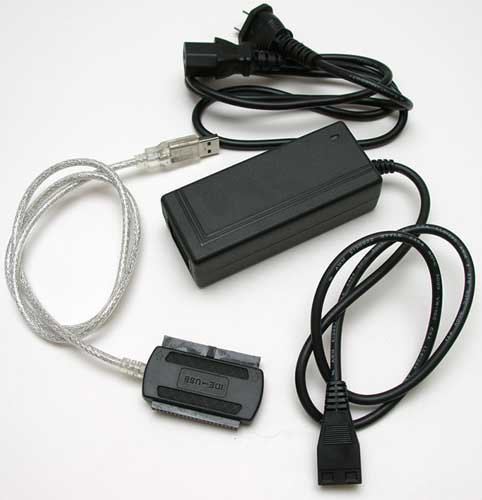
3.
The cable for fdd is the same as common computer's, you can dig a hole on the plastic plug to fit.
4.
Most fdd work with gdsf,but a few newer model drives need some mods.
I have used TEAC(1996 version),MITSUMI(1995 and 2003 Version),NEC(1994 and 2002 version),ALPS(BEST performance but consumes most energy,need a good psu),TOSHIBA(only this do not work)
Keep in mind that GDSF use a LM7805 to get power,it's only 1.5A out put,so you shuold choose a fdd that consumes less power,TEAC and NEC drives are good(0.65~0.75A),my ALPS fdd needs 1.0A +5V input.
5.
I never have a MAC,so I can't provide any useful info.
|
|
| Back to top |
|
|
TCJJ
Joined: 15 Apr 2012
Posts: 11
Location: New Zealand
|
| Posted: Mon Apr 16, 2012 10:23 pm Post subject: |
|
|
That's more useful info than I had before, so thanks very much. It appears that the Mac version of ucon64 is for the PowerPC architecture i.e. I'm not going to get it running on OS X Lion any time soon, so that's probably my problem there. I'll try running the Windows version through Parallels later.
You said the DSP pack wasn't worth buying. You mean the blue adapter? Because I don't have an adapter at all. So wouldn't that make it worth buying? I can't find the regular grey DSP adapter anywhere, so right now I can't hook the SF6 to my SNES.
I think my drive is a TEAC (or maybe NEC), so I'll double-check that but I have another old FDD which I can try as well. I'll get onto modding the cable, so hopefully I can at least get that working.
Also, that ExpressCard/34 to Parallel adapter I found apparently will not work for programming, including a Game Doctor. I'm still looking for a good Parallel adapter. I really don't want to resort to a PCI card, since that's a desktop-only solution. I'd like a universal one.
Edit: I have a Mitsumi FDD, model D353M3D. I'm not sure if that'll work, but it says it requires 5V. I'll get on Google and see if I can find more info on the drive.
I plugged the SF6 in with my Mega Drive model 1 power supply which should apparently work, but nothing happened. Granted, I obviously can't plug it into my SNES at the moment, but I was hoping that the FDD might light up. Is it normal for it not to, or should the light actually come on? My SF6 has a clear case, so I'm tempted to solder an LED to the board to show when it's powered on.
|
|
| Back to top |
|
|
madman
Joined: 07 Jul 2006
Posts: 598
|
| Posted: Tue Apr 17, 2012 3:37 am Post subject: |
|
|
I've yet to see any LPT adapters work that aren't PCI or built onto a mobo. I also don't know if the Mac version of ucon actually supports the sending functionality or not. I don't own any LPT adapters for my Macs so I can't help here, but the safe bet is it doesn't work.
There are probably dozens of threads on here about power supplies than can be used.
I don't really see the point in soldering an LED in for a power indicator. If it's plugged in, it's on. If you turn on your SNES and don't see the GDSF menu, it's not plugged in. It's not too complicated.
|
|
| Back to top |
|
|
ly63
Joined: 12 Feb 2012
Posts: 9
Location: China
|
| Posted: Tue Apr 17, 2012 4:11 am Post subject: |
|
|
| TCJJ wrote: |
Edit: I have a Mitsumi FDD, model D353M3D. I'm not sure if that'll work, but it says it requires 5V. I'll get on Google and see if I can find more info on the drive.
|
Your FDD's Power Consumption:
Operating W (typ.) 1.6
Stand-by W (typ.) 0.04
so the current requirement is 1.6W/5V=0.32A
It's good for your GDSF.
for detailed infomation,read pruduct SPECIFICATIONS PDF I have uploaded.
| Description: |
|

Download |
| Filename: |
D359M3D_datasheet.zip |
| Filesize: |
72.79 KB |
| Downloaded: |
249 Time(s) |
|
|
| Back to top |
|
|
ly63
Joined: 12 Feb 2012
Posts: 9
Location: China
|
| Posted: Tue Apr 17, 2012 4:24 am Post subject: |
|
|
| TCJJ wrote: |
I plugged the SF6 in with my Mega Drive model 1 power supply which should apparently work, but nothing happened. Granted, I obviously can't plug it into my SNES at the moment, but I was hoping that the FDD might light up. Is it normal for it not to, or should the light actually come on? My SF6 has a clear case, so I'm tempted to solder an LED to the board to show when it's powered on. |
It is normal that nothing happends while you just power on the GDSF unit without pluging it into SNES, you can only heard a 'click' sound from the FDD's step motor.
the GDSF BIOS software was not running,of course it will not command the FDD to do any thing,so the led will not light up.
|
|
| Back to top |
|
|
TCJJ
Joined: 15 Apr 2012
Posts: 11
Location: New Zealand
|
| Posted: Tue Apr 17, 2012 5:39 am Post subject: |
|
|
| madman wrote: | I've yet to see any LPT adapters work that aren't PCI or built onto a mobo. I also don't know if the Mac version of ucon actually supports the sending functionality or not. I don't own any LPT adapters for my Macs so I can't help here, but the safe bet is it doesn't work.
There are probably dozens of threads on here about power supplies than can be used.
I don't really see the point in soldering an LED in for a power indicator. If it's plugged in, it's on. If you turn on your SNES and don't see the GDSF menu, it's not plugged in. It's not too complicated. |
I believe Mac can send, but it is a PowerPC application so I cannot use it on OS X Lion either way. I'll try to run it in Parallels. I installed Windows 8 but it's being bothersome so I'll put Win7 on there later and hopefully that'll work, else I'll just install Win98 or one of my many copies of WinXP.
Anyway, I just like to have the indicator that the power is indeed on. For starters, it'll allow me to make sure that the SF6 is getting power until I get an adapter to actually use it with my SNES, and I'll also be able to see if it's getting power should I ever need to troubleshoot it. I could even add a power switch if I wanted but I don't think I could be bothered. I just like to have all my consoles plugged in at once but have the ability to turn them on and off without touching the plugs.
As for the power supply, from what I've read here, the Mega Drive model 1 power supply is ideal, and looking at mine, the specs fit perfectly.
Also, about my FDD. Tomy posted about Mitsumi drives needing a modification, and I can see why. The reason I have to make extra holes in the plastic IDE cable is because pin 5 does not exist on either end, so you basically have to bridge pin 5 and 17. I'll do that soon and hopefully get that working (although again, I can't test it until I have an adapter. Is the blue DSP adapter the best to buy?) but until then, I'll just have to get everything else set up.
|
|
| Back to top |
|
|
TCJJ
Joined: 15 Apr 2012
Posts: 11
Location: New Zealand
|
| Posted: Thu Apr 19, 2012 8:35 am Post subject: |
|
|
I just thought I'd bump this post with an update. I apologize if bumps aren't allowed on these forums but I couldn't find anything saying otherwise.
When I made my last post, I didn't see your posts, ly63. That's helpful info, and I have now modified my IDE cable and successfully installed my floppy drive. Plugging in the GDSF definitely makes the stepper motor make a "click" sound, so it seems to be in working order.
All I need now is the adapter to plug it into the SNES, but I'm not sure what to buy. Is the blue DSP adapter on the ToToTEK store the correct one? Because I believe the original was grey (and sounds like it doesn't have the extra pins - I believe they are the DSP pins - for special chips such as Super FX).
I was also wondering if it would be possible to just build one with some vero/strip board and/or a donor SNES cart (one that I've already taken parts off of to repair another cart). If it is possible, then it could save me some money and also save me waiting for it to arrive (because I'm fairly impatient). I can solder, and I believe it needs a capacitor, which I can easily provide. I also have the donor cart's case which I could modify to fit the adapter into, but again, I just want to know if this is possible, and if it is, if there is any advantage (functionality-wise) in buying a DSP adapter from ToToTEK.
|
|
| Back to top |
|
|
MottZilla
Joined: 08 Sep 2004
Posts: 765
|
| Posted: Thu Apr 19, 2012 6:49 pm Post subject: |
|
|
DSP adapter is ONLY for DSP1 games. Not Super FX. Below are most of the DSP1 games. The DSP1 adapter for the GDSF series is around 35$ I think. The DSP adapter will work for connecting your system to play other games just fine. I've heard it's possible some non-DSP games may not like the DSP adapter but I have never heard of any confirmed problems.
DSP Series:
1991 - Pilot Wings
1992 - Super Bases Loaded 2
1992 - Super Mario Kart
1993 - Final Stretch
1993 - Lock-On/Super Air Diver
1993 - Ace Wo Nerae
1993 - Armored Trooper Votoms
1993 - Super 3D Baseball
1993 - Suzuka 8 Hours
1994 - Bike Daisuki! Hashiriya Kon - Rider's Spirits
1994 - Michael Andretti's Indy Car Challenge
1994 - Shutokou Battle 2
1994 - Tsuchiya Keiichi: Shutokou Battle 94'
1995 - Ballz 3D (DSP-1B)
1995 - Battle Racers
1995 - Super Air Diver 2
199? - Syutoko Battle Racing 2
199? - Suzuka 8 Hours
199? - Syutoko Battle Racing 94
1995 - Super F1 Circus Gaiden
|
|
| Back to top |
|
|
TCJJ
Joined: 15 Apr 2012
Posts: 11
Location: New Zealand
|
| Posted: Fri Apr 20, 2012 1:07 am Post subject: |
|
|
| Oh okay, thanks for that info. Are there any connectors that will allow Super FX games?
|
|
| Back to top |
|
|
madman
Joined: 07 Jul 2006
Posts: 598
|
| Posted: Fri Apr 20, 2012 1:38 am Post subject: |
|
|
| TCJJ wrote: | | Oh okay, thanks for that info. Are there any connectors that will allow Super FX games? |
Nope.
|
|
| Back to top |
|
|
TCJJ
Joined: 15 Apr 2012
Posts: 11
Location: New Zealand
|
| Posted: Fri Apr 20, 2012 1:42 am Post subject: |
|
|
Oh well, I'll make do then. I will ask though, is there a way to patch a game on the fly? My example would be that I have Dragon Quest V (for Super Famicom, obviously), and I was wondering if I could patch it with the English translation via floppy or parallel (obviously not patch the ROM, but patch the game whilst it's loaded, by loading the translation into RAM), or would I HAVE to dump the ROM from the game, patch it, then transfer it to my Game Doctor through floppy or parallel?
Also, how do I know how much RAM I have? I only have the internal chip installed, so it's safe to assume it's the stock 32MB, but it IS second-hand, so I can't guarantee that it wasn't changed. I looked and looked but couldn't find any indication as to its size.
|
|
| Back to top |
|
|
MottZilla
Joined: 08 Sep 2004
Posts: 765
|
| Posted: Fri Apr 20, 2012 4:16 am Post subject: |
|
|
The menu will show you how much is loaded, so will doing the "Self Test" option.
The SF6 *should* have 32 Megs minimum. However it is possible someone could have put less than that into it if they opened it up.
For the translation, you'd have to dump your cartridge. Convert it to the proper format to patch it, patch it, then load it back onto the GDSF6. You cannot patch it while it is loaded into the GDSF6. That would be a neat feature though.
|
|
| Back to top |
|
|
TCJJ
Joined: 15 Apr 2012
Posts: 11
Location: New Zealand
|
| Posted: Fri Apr 20, 2012 6:55 am Post subject: |
|
|
Yeah, it sure would be. Well, thanks for all the advice.
Now if only I could fix this copy of Dragon Quest V. I was talking about THAT on different forums, because it's more manual labour modding stuff, although if anyone here knows how to rewire a cartridge's lockout chip to bypass broken solder points and tracks, as well as fixing any other broken tracks that may or may not exist, then that's just what I need. I have no idea what this game is worth (and I got it for about NZ$2.50, which is around US$1), but I know that I want to play it.
|
|
| Back to top |
|
|
MottZilla
Joined: 08 Sep 2004
Posts: 765
|
| Posted: Fri Apr 20, 2012 4:53 pm Post subject: |
|
|
| The lockout chip in a cartridge doesn't need to work for you to dump it and play it on the SF6. However if other tracks are damaged or broken then you have a problem.
|
|
| Back to top |
|
|
|
|
You cannot post new topics in this forum
You cannot reply to topics in this forum
You cannot edit your posts in this forum
You cannot delete your posts in this forum
You cannot vote in polls in this forum
You can attach files in this forum
You can download files in this forum
|
Powered by phpBB © 2001, 2005 phpBB Group
|
 FAQ
FAQ Search
 Memberlist
 Usergroups
 Register
 Profile
 Log in to check your private messages
 Log in


